← Homset Apps Liretta EN IT
Liretta

Every euro has a job

Envelope budgeting you own.

Liretta helps you give every euro a job, and keeps the whole picture in one readable file on your own device. What you don't spend stays in its envelope, overspending shows at once, and known bills are funded before they fall due. No account, no ads, nothing collected.

Free to use · No ads · No login

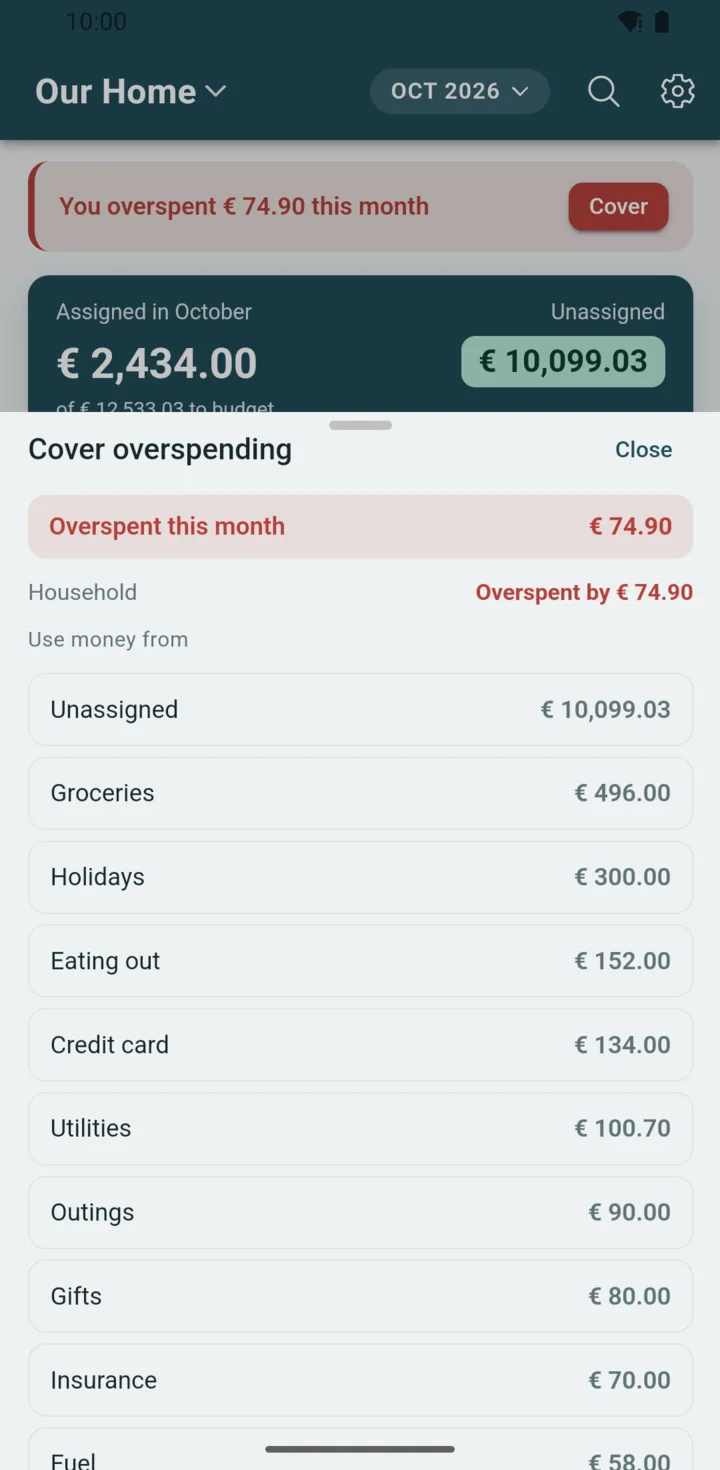
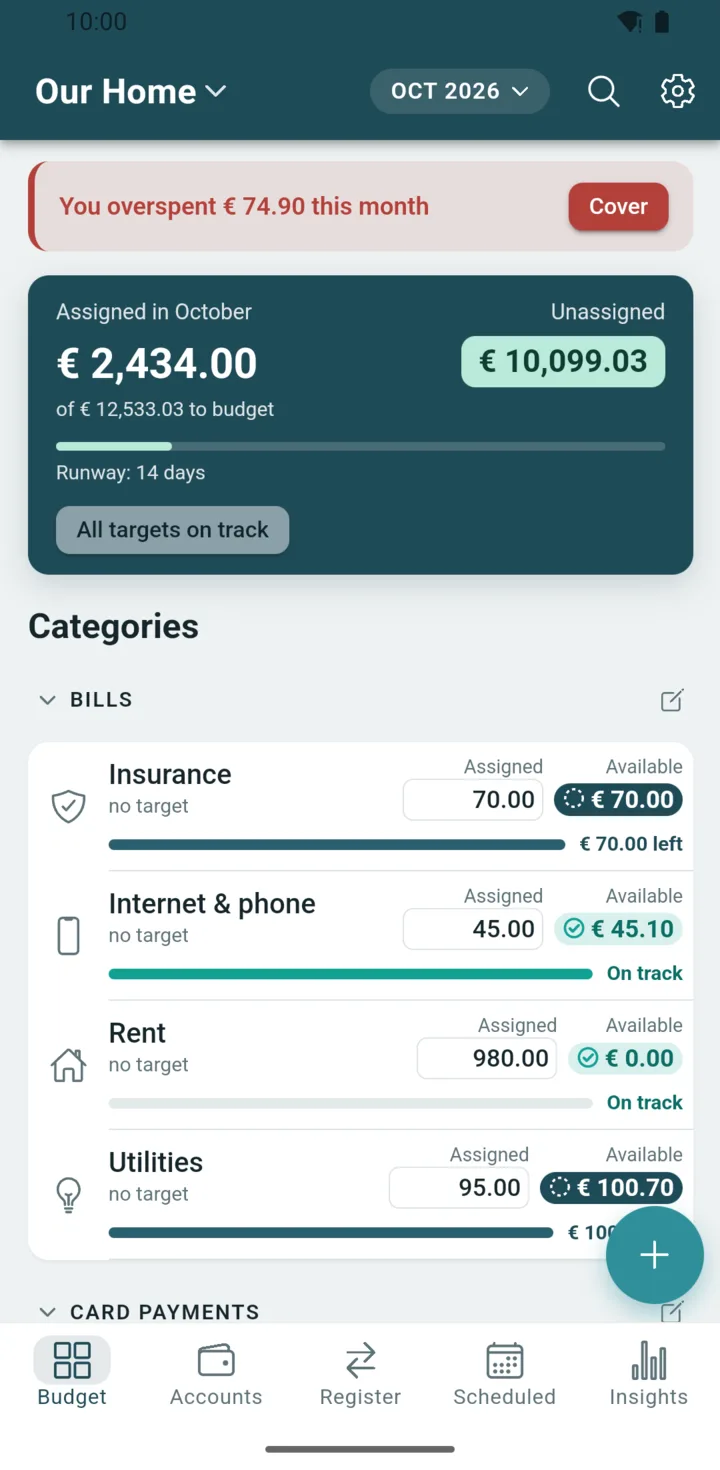
The Liretta budget screen for the Our Home budget in October 2026: € 2,058.00 assigned, € 785.40 still unassigned, a banner saying € 74.90 was overspent this month with a Cover button, and the list of categories.

  • No accountNothing to sign up for
  • Works offlineAirplane mode is fine
  • One fileOpen, readable, yours
  • Bring your historyImport it from another app

Why Liretta

Intuitive doesn't have to mean simplistic.

The envelope method, done faithfully: every euro gets a job, envelopes roll over, and overspending is never hidden. Each screen shows one number that matters, one action per job, and every tap has a way back.

Assigned in September Unassigned
€ 3.720,00 € 125,75

Unassigned, at a glance

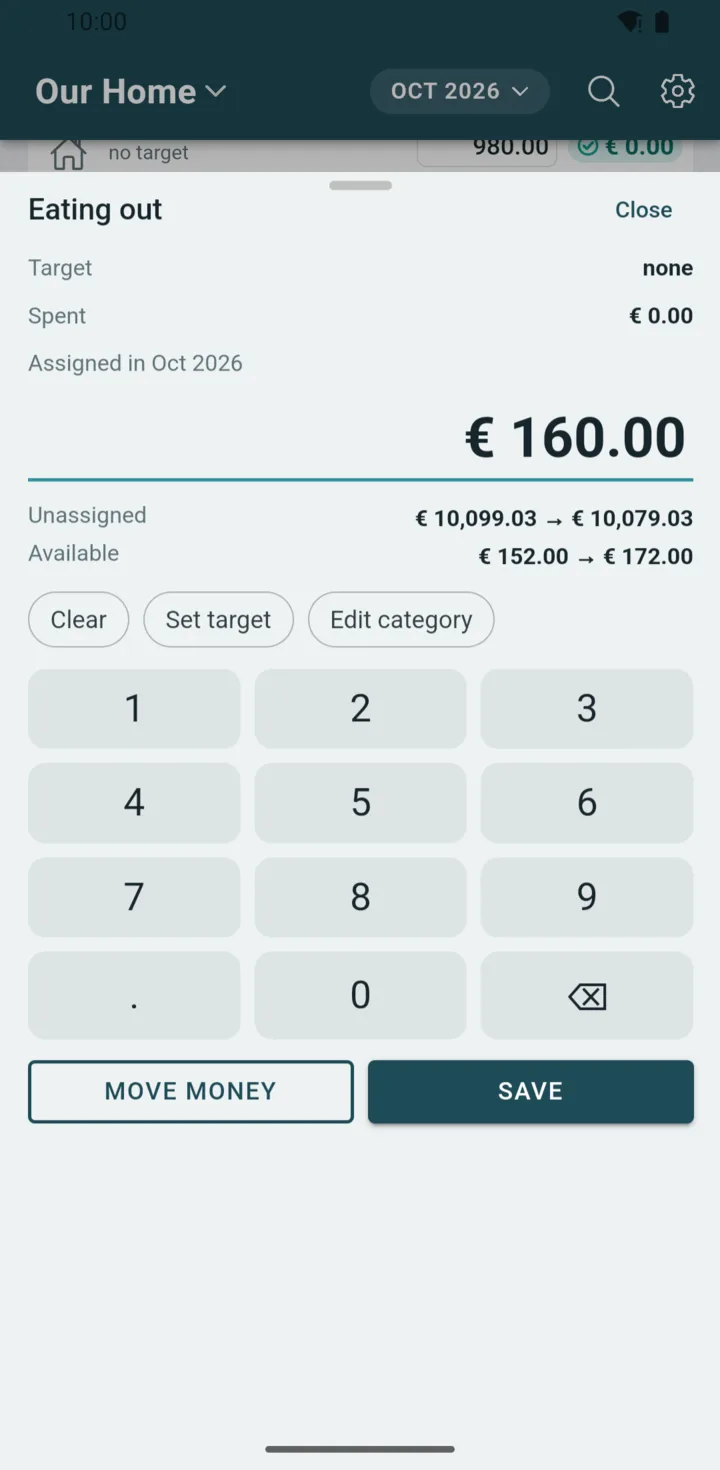
One number answers “what can I still give a job?”. Assign to a category and it updates instantly; fund every target that's short with a single tap.

Groceries € 600,00 monthly € 147,90
Fund 2 targets · € 65,00

Targets that fund themselves

Set a monthly refill, a by-date goal, or a yearly bill that's coming. Each category then shows what it needs this month (Needs € 40) or that it's On track.

Assigned € 40,00 to Groceries Undo
Every change shows an Undo

Change your mind, safely

Every change shows an Undo right away. Edits and undos are written to the file as new entries, so the history is never rewritten behind your back.

Supermarket Groceries · cleared − € 42,30
Salary Unassigned + € 3.575,75

A register you can actually read

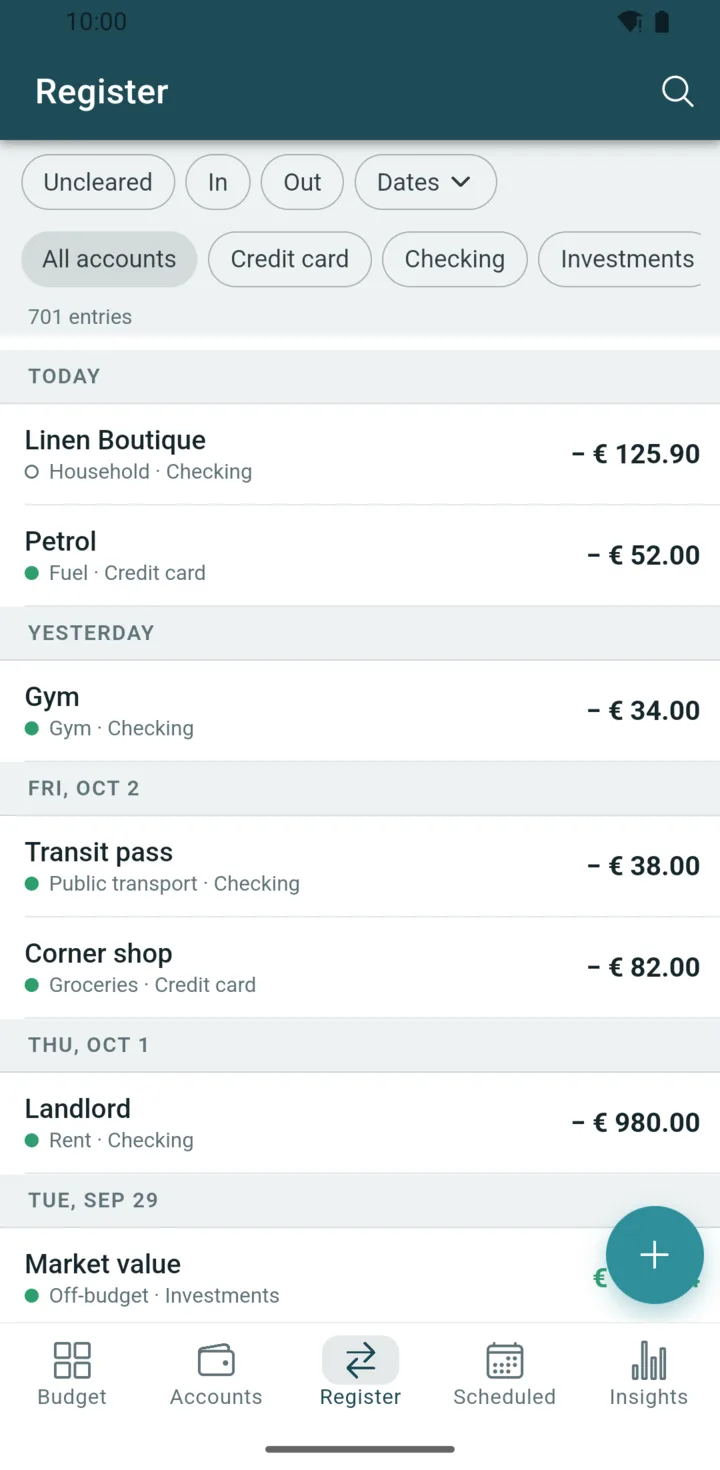
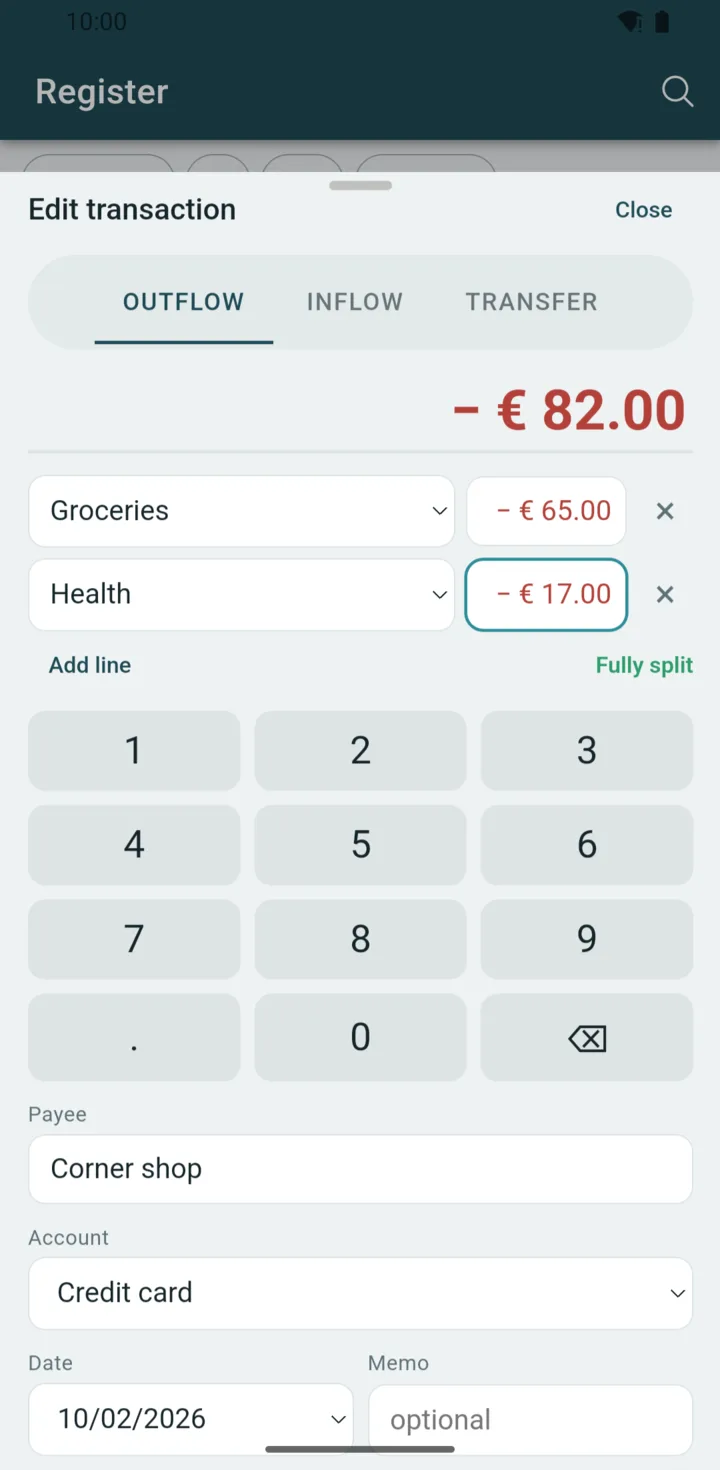
Split a transaction across categories, record transfers between accounts, search by payee or memo, and filter by account or by uncleared entries. Scheduled payments post automatically when you open the app on or after the day they're due.

  • Cover overspending from any category
  • Move money between categories
  • Split transactions and transfers
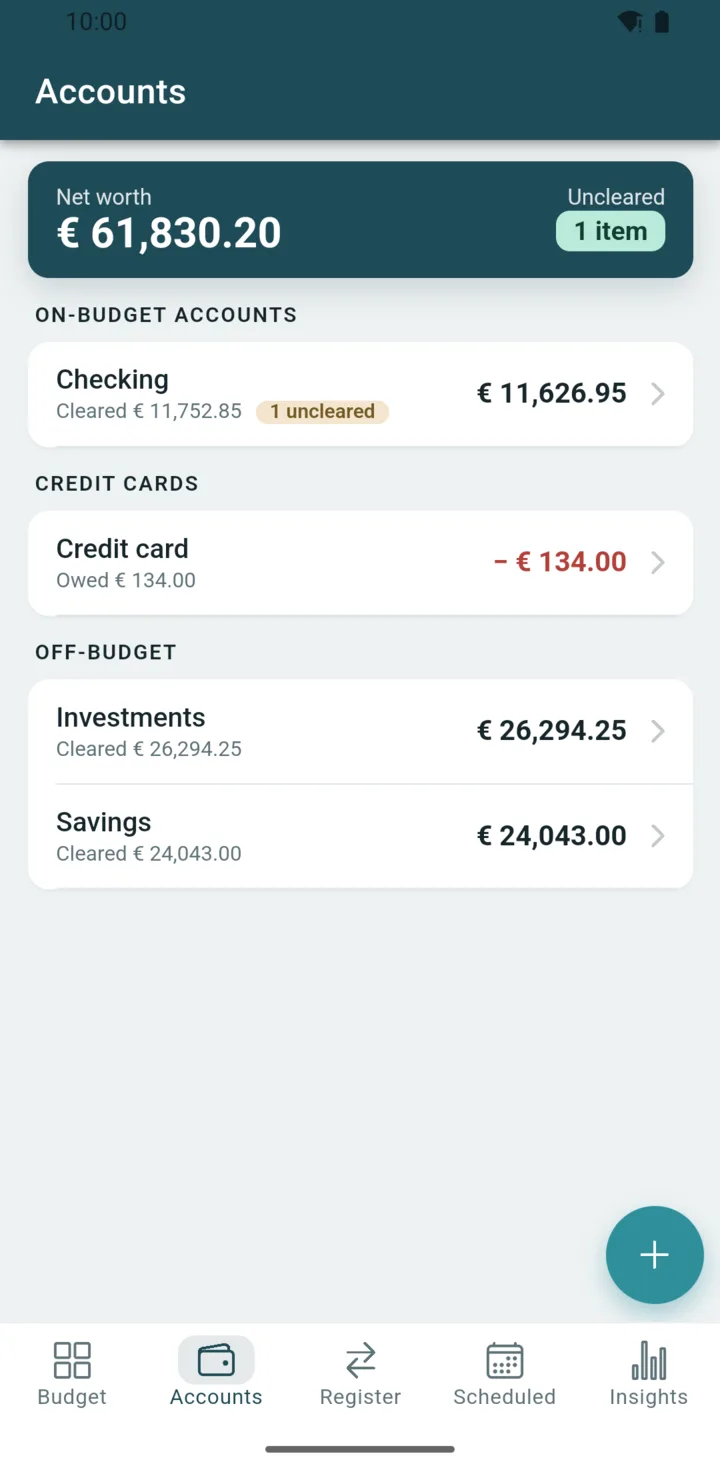
  • Credit cards, each with its own payment category
  • Payee suggestions
  • Hide, merge and drag to reorder categories
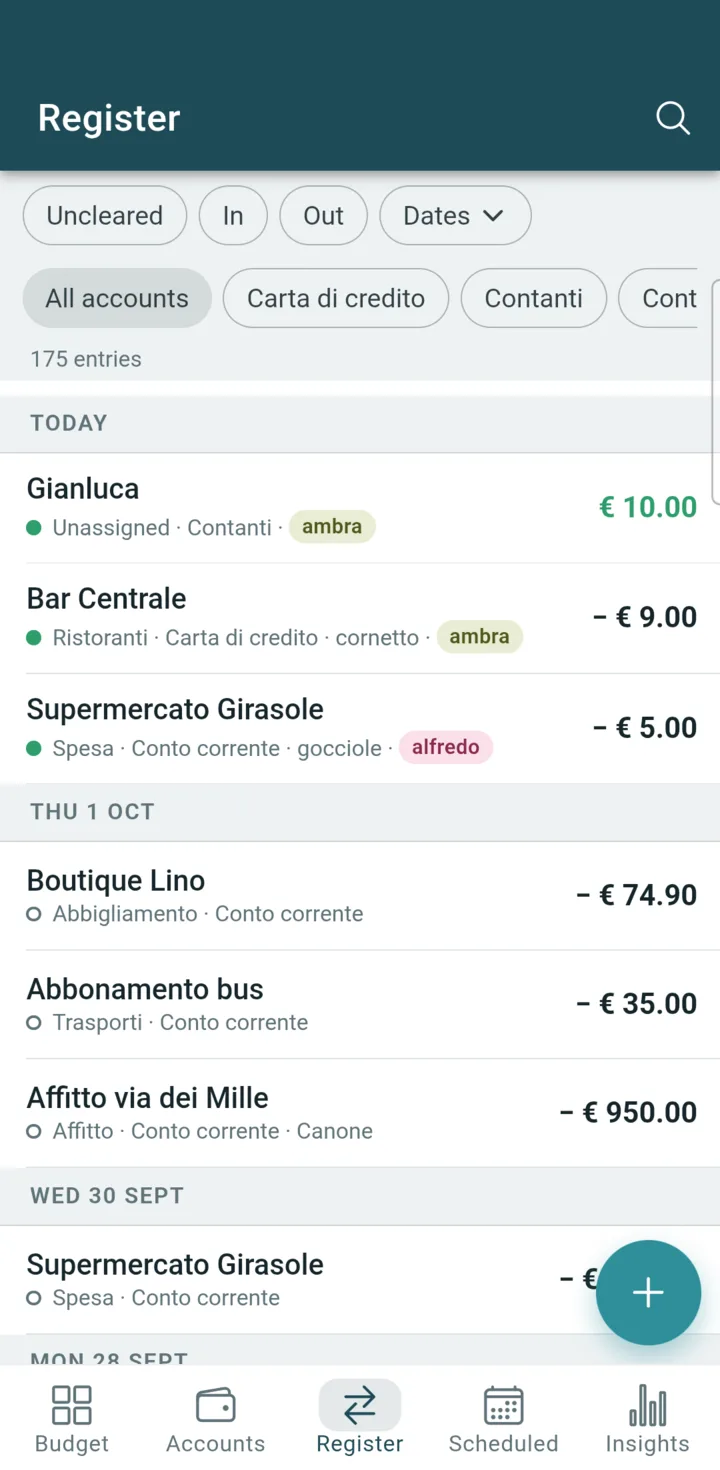
  • English and Italian
  • Register export as CSV, in YNAB's layout

See it in action

The real app, on a real phone.

These are screenshots of the current Android build, filled with a made-up household budget. Scroll sideways to see them all.

Watch

Liretta in under two minutes.

Recorded on a real phone with the current Android build, using a fictional demo budget.

Liretta in 45 seconds. What it is and why it lives in a file you own.
Create your first budget. From a blank start to an account, targets and a first transaction.
From YNAB to Liretta. Export your plan from YNAB and import it, history included.
A tour of Liretta. Covering overspending, targets, undo, splits, scheduled payments and Insights.

Insights Premium

See where the money went.

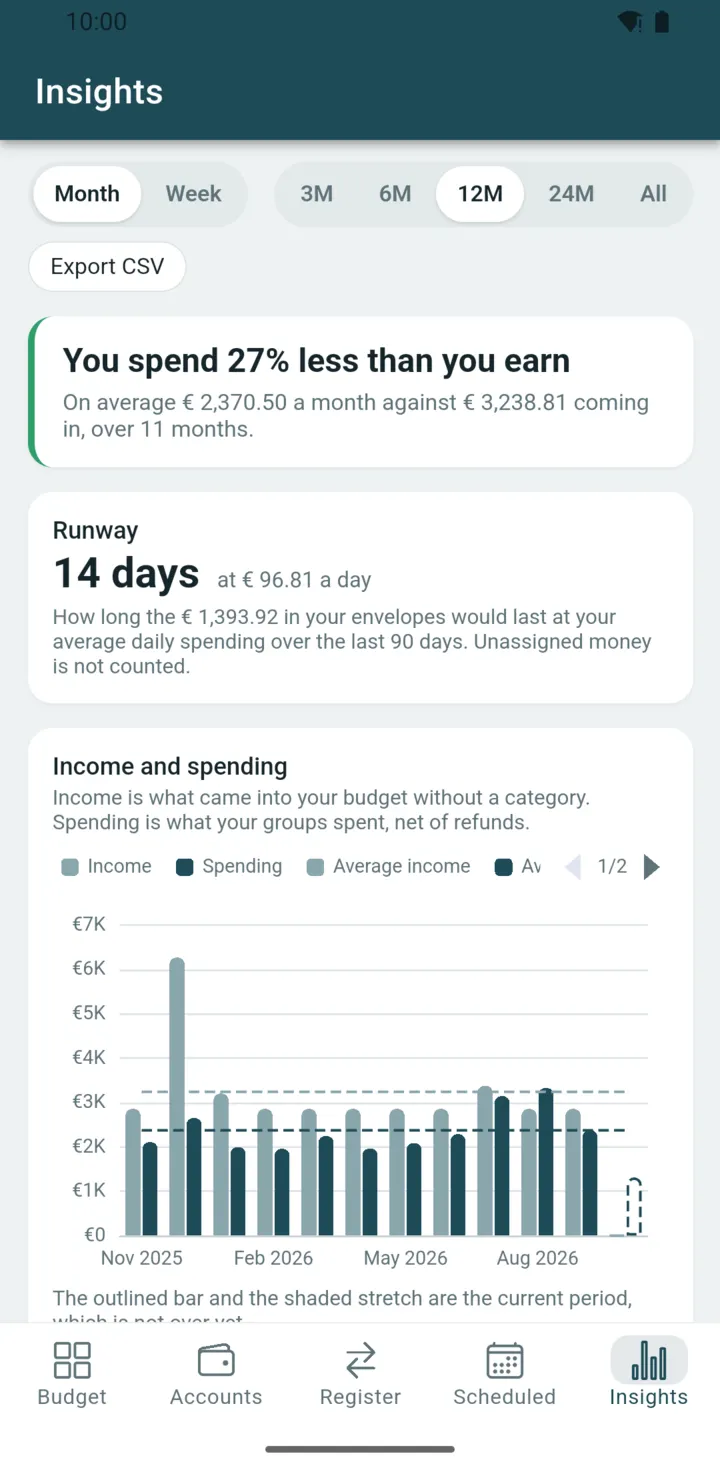
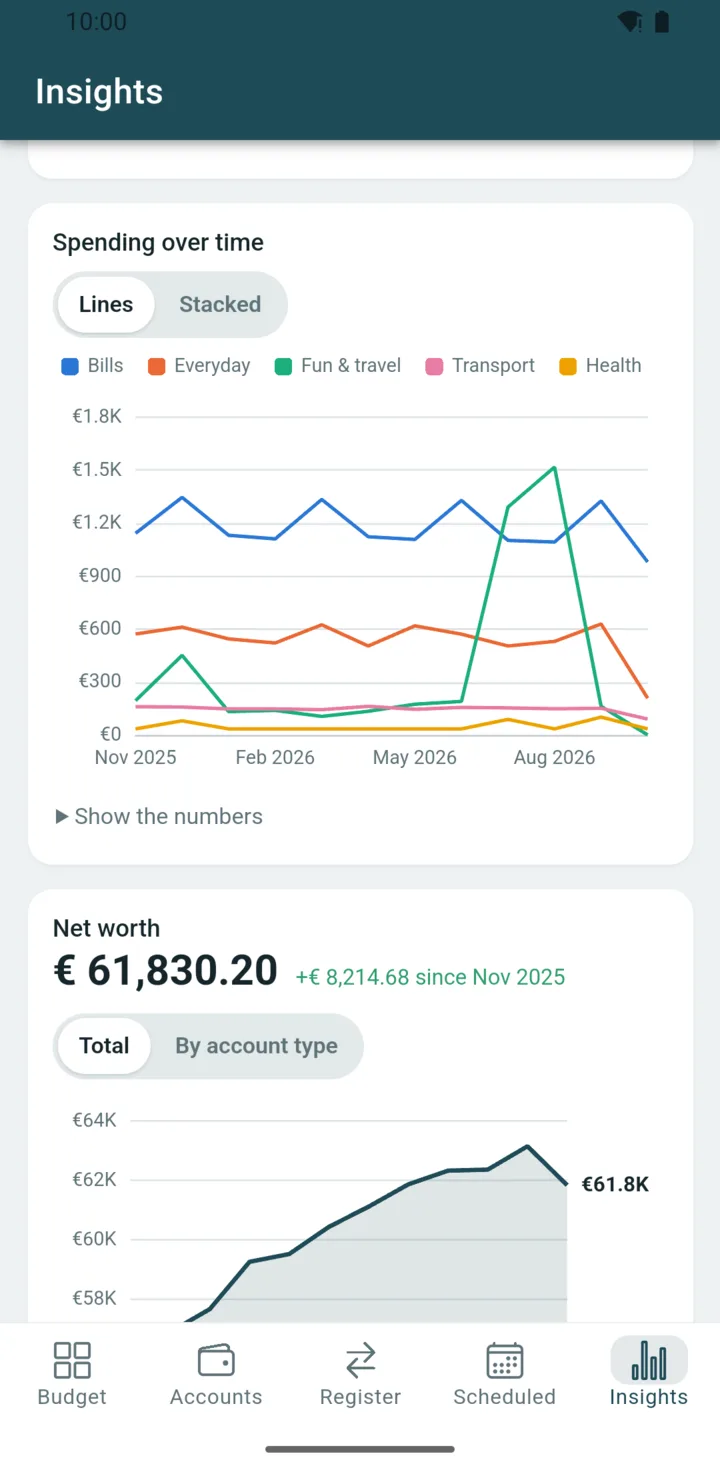
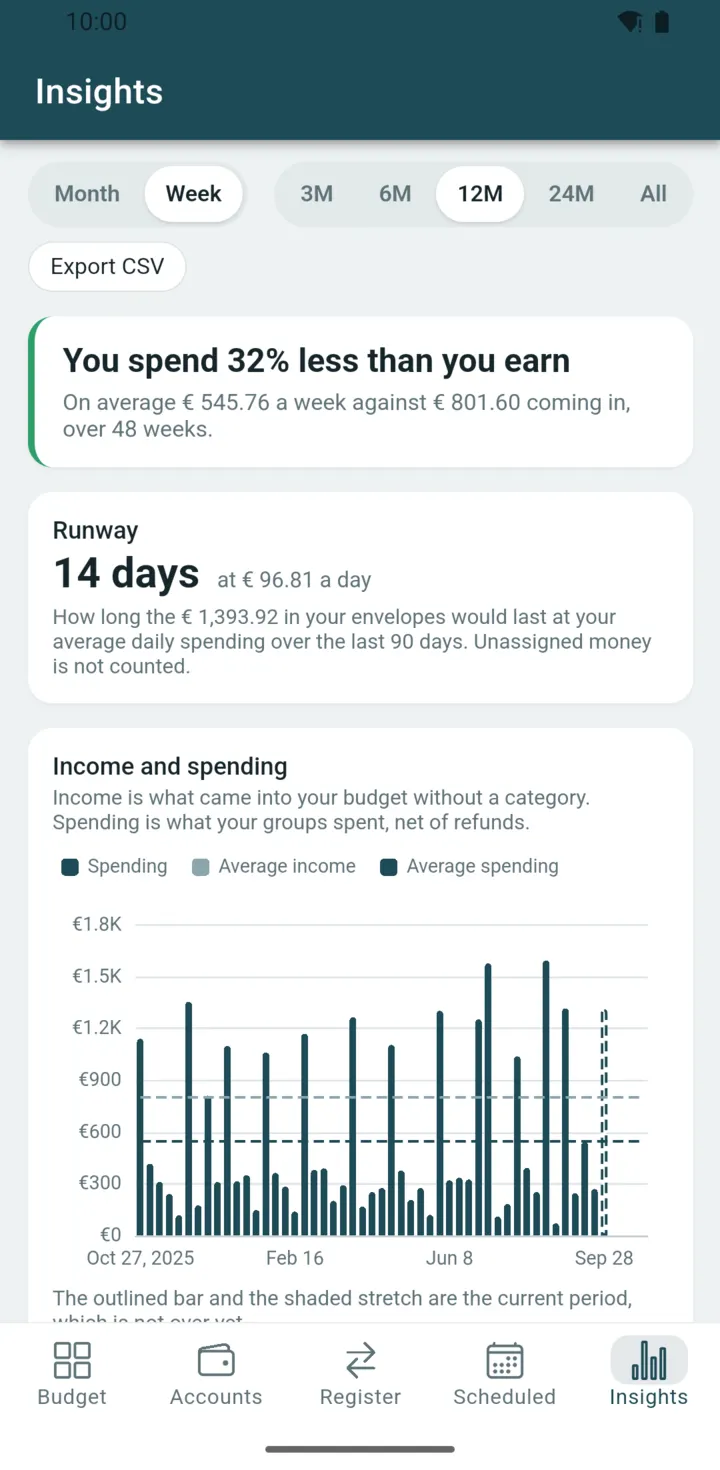
Insights turns your budget into charts, worked out on your device from the same file. Pick Month or Week, and a range of 3M, 6M, 12M, 24M or All.

  • Income and spending. Bars with average lines, and a one-line summary such as “You spend 39% less than you earn”.
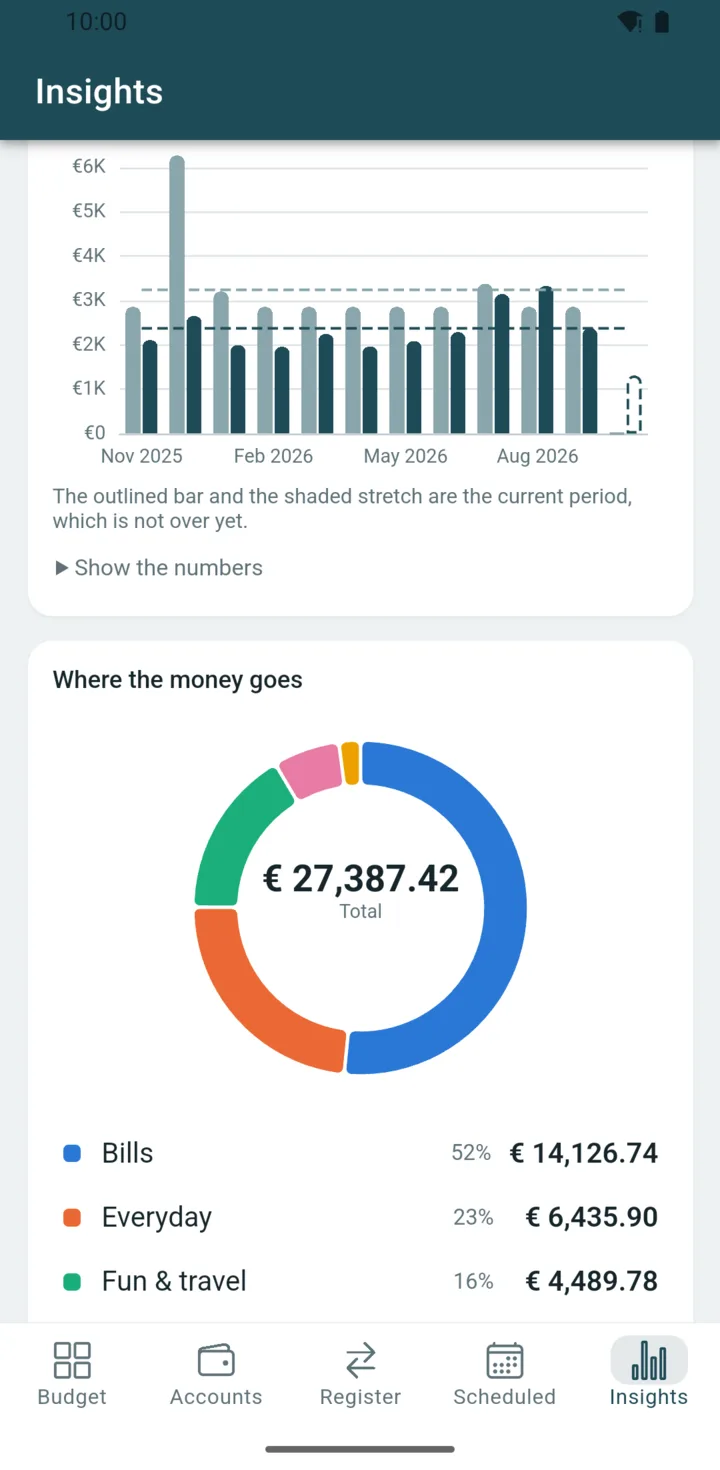
  • Where the money goes. A donut chart by category group.
  • Spending over time. Lines or stacked, by category group.
  • Net worth. The total, or split by account type.

Every chart has Show the numbers, which turns it into a table, and the current period, which isn't over yet, is marked on the chart.

Insights in Week view: the summary You spend 39% less than you earn and weekly income and spending bars, with the current week outlined.

Privacy, by construction

The free app is completely offline.

Liretta has no backend. There is no account to create and no sync service of ours to trust, because we don't run one. The budgeting engine itself runs on your device, compiled to WebAssembly. Sync is a Premium feature you turn on yourself, and it goes straight from the app to your own Google Drive, where the people you invite meet you.

  • No account, no login. Open the app and your budget is there. No password to forget, no email to hand over, no “verify your identity” to budget your own money.
  • No servers, no telemetry. The free app makes no network requests at all. This page doesn't track you either: no cookies, no analytics, not even a font CDN.
  • Your file, your backup. One .lir file holds accounts, transactions, assignments, targets and schedules. Back it up like any other document.
  • Sync on your terms. Keep it to one device, point a file-sync tool you already trust at the file, or turn on Google Drive sync: your devices, and the people you invite, meet in your own Drive. No Homset server in between.
family.lir plain text
{"id":"78501f42…bcaae","index":0,
  "parent":null,
  "payload":{"tag":"Genesis",
    "budgetName":"family","currency":"EUR",
    "decimals":2},
  "stamp":"2026-09-05"}

{"id":"86fc4468…331f4","index":2,
  "parent":"f226fe1a…220ce",
  "payload":{"tag":"Txn","payee":"Supermarket",
    "txnLines":[[null,-4230]],
    "cleared":"Cleared"},
  "stamp":"2026-09-02"}

Every block carries its own SHA-256 id and the id of its parent. This is real output from the engine. Change one character in the past and the chain can prove it.

  • Tracking SDKs
  • Analytics
  • Ads
  • Accounts
  • Cloud sync you didn't ask for

Switching from another app

Bring your budget with you.

Keep your history instead of starting over. Today Liretta imports YNAB's plan export; these are the steps.

  1. Export from YNAB

    In YNAB, use Export Plan. It hands you two CSV files: your register and your plan. Those are exactly what Liretta needs.

  2. Import into Liretta

    On Liretta's welcome screen, open Import from YNAB, pick the register CSV and, if you like, the plan CSV, choose the date order used in the files, then choose where to save the new budget file.

  3. Review and carry on

    Accounts (credit cards and off-budget tracking accounts too), opening balances, categories, payees, memos, splits, transfers and your monthly assignments arrive with no re-typing. Targets are the exception: set them again on each category, it takes a tap.

Leaving is just as easy. Your budget is one readable file, and the register exports as CSV whenever you like. Coming from a different app? Tell us which one, and what it exports.

Liretta is an independent app by Homset S.r.l.s., not affiliated with or endorsed by YNAB.

Android now, iOS planned

One engine, everywhere you budget.

The same Haskell engine compiled to WebAssembly runs on every platform, so your budget behaves identically on a phone and on a desktop.

On Google Play

Android

A native app built with Tauri, in daily use on our own phones. It is on Google Play now.

Planned

iPhone & iPad

The budgeting engine is already platform-neutral. An iOS shell around it is planned.

Windows · macOS · Linux

Desktop

The Tauri desktop shell opens and saves your .lir through native file dialogs. Installers are coming.

Pure Haskell engine Compiled to WebAssembly One engine on every platform

There's also a plain browser build for trying things out. Your budget then lives in the browser's local storage, and saving means downloading the file.

Pricing

Free where it matters.

The whole budgeting engine is free: your data, your budget, your imports. Premium adds extras around it for €4.99 a month. Try the free version first and see whether you need them.

Free

Today and always
  • The full budgeting engine, with unlimited budgets and accounts
  • Unassigned, targets and scheduled payments
  • Import from YNAB's plan export, and CSV export
  • Undo, an append-only history, divergence detection
  • Your file, exportable at any time

Premium

€4.99 / month

Extras for people who want more from their budget. One promise on every tier: your budget file is never held hostage. Everything you put in stays readable and exportable, and none of these extras gets in the way of that.

  • Insights: income and spending, where the money goes, spending over time, net worth
  • Month or week view, from 3 months to all time
  • Show the numbers behind every chart
  • Google Drive sync across your devices, through your own Drive
  • A shared household budget: invite someone by email, and you both write the same budget
  • Reminders for upcoming payments
  • Priority support by email

Coming next: hold any amount in the budget to see what it is made of, entry by entry.

Premium is available in Google Play.

No subscription will ever be needed to open your own file.

Questions

Things people ask before switching.

Where exactly is my data?

In one file on your device, for example family.lir. The free app never uploads it; Premium sync writes it to your own Google Drive, and only once you turn it on. Saving, backing up and moving it are ordinary file operations, and nothing proprietary sits in the way.

Does the app phone home?

The free app doesn't: it needs no network at all, and your budget works in airplane mode. There is no telemetry, no crash reporting that leaves the device, no analytics SDK. Report a problem opens your own email app with a message you read before sending. With Premium, sync and the household talk to your own Google Drive, and to nothing else.

How do I sync phone and computer?

Two ways. Turn on Google Drive sync in Settings: each device you sign in with the same Google account gets the budget, changes travel through your own Drive, and the app merges them. Or point any file-sync tool you already trust at the file: Syncthing, a synced folder, a NAS, a USB stick; if two copies drift apart, Liretta tells you whether they agree or one is ahead, and from which point they diverged.

What about credit cards?

Yes. Each card gets its own payment category that sets money aside as you spend, the budget warns you when you overspend on credit and shows what the card owes, and the import recognises your cards.

Do I have to start over if I switch?

Not if you're coming from YNAB: export your register and plan with Export Plan, import them, and keep your history: accounts (credit cards and off-budget tracking accounts too), opening balances, categories, payees, memos, splits, transfers and monthly assignments come with you. Targets don't, but setting one again takes a tap. From another app? Tell us what it exports.

Can two people share one budget?

Yes. Open the budget, Settings, Sync, Household, and invite the other person by email. They tap the link once, pick the shared files in Google's picker, and the budget is theirs too. Every change shows who made it. The files live in your Google Drive, shared with them alone; Homset never sees them. Both of you need Premium.

How is it built?

A pure Haskell budgeting engine compiled to WebAssembly, with a TypeScript UI in a Tauri shell. The engine is deterministic and property-tested: the same chain of blocks always folds into the same budget, on every platform.

Take your budget back.

Free to use, private, and yours. Android is on Google Play; iOS and desktop are still to come.